
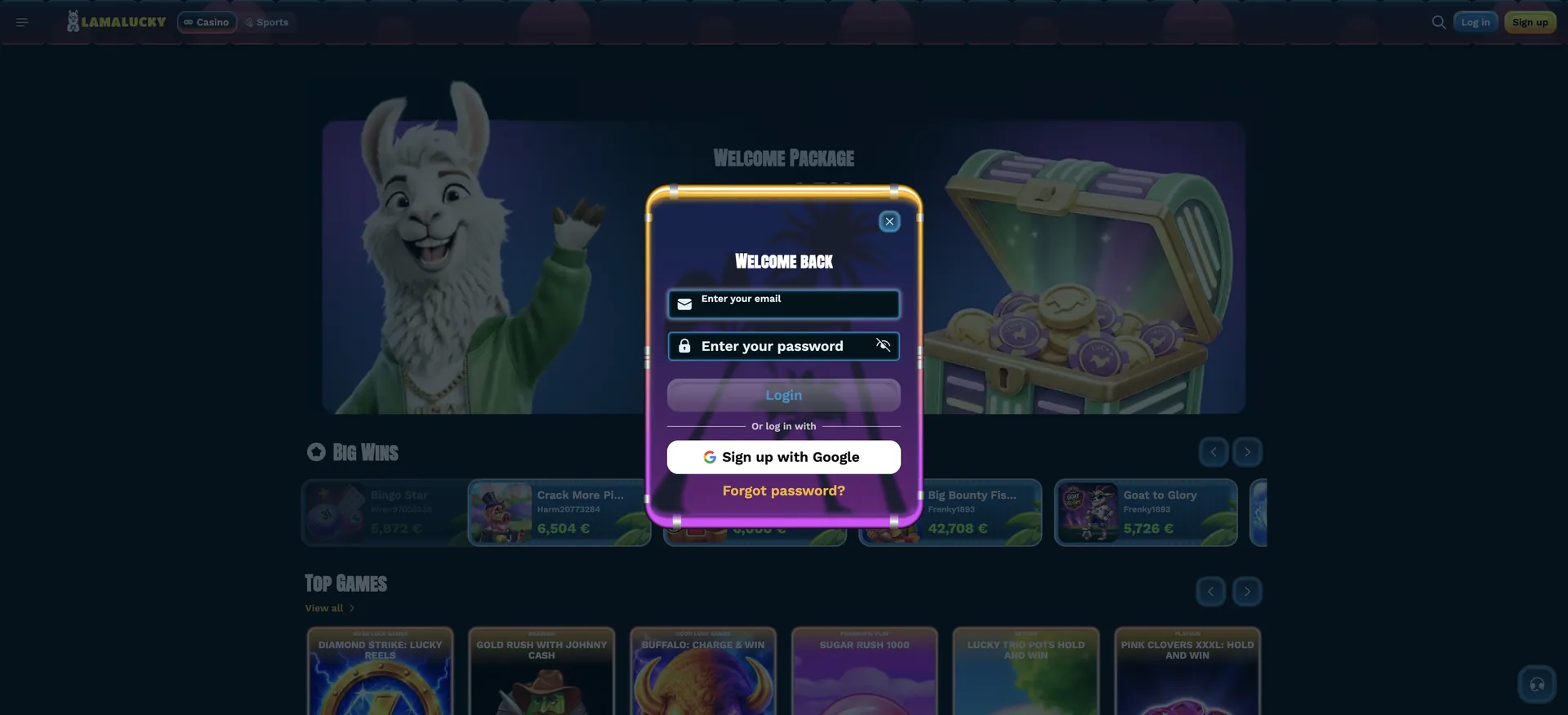
LamaLucky login is done through the blue Log in button in the top-right corner of every page, next to Sign up. The "Welcome back" window asks for the account email and password, and a Sign up with Google button below the form signs in accounts linked to Google. If the password is forgotten, the "Forgot password?" link in the same window starts a reset by email. If login still fails - for example because of a suspended account or a location block - 24/7 live chat, opened from the headset icon in the bottom-right corner, resolves it.
The account is protected by SSL encryption, and withdrawals are only processed once the account is verified with ID and proof of address. Below are the steps to sign in, recover a password, log in on mobile and fix the most common errors for Australian accounts.
| Login essentials | Details |
|---|---|
| Where to log in | Log in button, top-right corner |
| Login details | Email and password |
| Social login | Sign up with Google |
| Password reset | "Forgot password?" link - confirmation sent by email |
| Device support | Desktop and mobile browsers, installable casino app |
| Session security | SSL encryption |
| When verification appears | Usually at the first withdrawal |
| Currency | AUD |
| Support | 24/7 live chat, [email protected] |
How to log in to LamaLucky
The login window opens as a pop-up over the current page, so after signing in players return to the same game or promotion. Two routes are available: the email form and Google.
Step-by-step LamaLucky login
Signing in takes a few seconds and works the same on desktop and mobile.
- Open the LamaLucky website.
- Click Log in in the top-right corner.
- Enter the email address used at registration.
- Enter the password; the eye icon shows the characters to check for typos.
- Click the Login button.
- Or click Sign up with Google under "Or log in with" if the account is linked to Google.
Create an account if you do not have one
Players without an account use the yellow Sign up button next to Log in. Registration needs an email address, username and password, or a Google account.
Quick registration flow
The welcome package is credited automatically after the first deposit, so no code is needed.
- Click Sign up and enter an email, username and password.
- Choose AUD as the currency and accept the terms.
- Deposit from AUD 20 to receive the first deposit bonus and free spins.
Secure login practices
The terms make the account holder responsible for any activity carried out with their login details, and allow only one account per household, IP address and device. A few habits keep the account safe.
- Use a unique password not used for email or other sites.
- Do not share login details or let anyone else play on your account.
- Avoid the "remember password" function on shared devices.
- Log out after playing on a shared computer.
- Keep the registered email secure, as password resets go there.
- Do not use a VPN; the terms treat location masking as a breach.
LamaLucky password reset
A forgotten password is reset from the login window. The reset email goes to the registered address, which is why the terms require a valid email at sign-up.
Reset steps
The process takes a few minutes and does not require support unless the email fails to arrive.
- Click Log in, then Forgot password?.
- Enter the email registered on the account.
- Open the email from LamaLucky and follow the steps.
- Set a new password; a confirmation email arrives once it is updated.
- Log in with the new password.
- If nothing arrives, check spam, then contact live chat.
LamaLucky login on mobile
On a phone, the same Log in button and pop-up work in Safari, Chrome and other browsers, and in the casino app installed from the side menu. Once signed in, the casino lobby, sportsbook, cashier and promotions are all available. Web push notifications can be accepted when prompted, or turned on later in the browser settings.
Tips for mobile login
Most mobile login problems are caused by autofill or browser settings rather than the account.
- Check autofill has not inserted an old password or a space after the email.
- Allow cookies for the site so the session is kept.
- Make sure the correct Google account is selected when using Google sign-in.
- Update the browser if the pop-up does not open.
Troubleshooting common LamaLucky login errors
When login fails, the cause is usually one of the four situations below.
Incorrect credentials
An error after clicking Login means the email and password combination does not match.
- Retype the password manually and check Caps Lock.
- Try Google sign-in if the account may have been created that way.
- Use Forgot password? to set a new one.
"LamaLucky cannot be accessed"
This message appears when the site detects a restricted location. It states that registrations from that location are not accepted due to regulator restrictions and suggests turning off any proxy or VPN and refreshing the page. Australia is not on the restricted list, so for Australian players the usual cause is an active VPN or proxy.
Browser or cache issues
If the Log in button does nothing or the session drops after signing in, stored browser data or an extension is often responsible.
- Clear cache and cookies and reload the page.
- Disable ad or script blockers for the site.
- Try another browser.
Account suspended
According to the FAQ, an account may be suspended because of security checks, duplicate accounts linked to the same device, IP address or browser, or other breaches of the terms. Self-exclusion also disables the account for the chosen period. Live chat can confirm the reason and the next steps.
What you access after LamaLucky login
After signing in, the account menu opens the personal sections. These are the ones used most often.
- Cashier: deposits by card and crypto, withdrawals with your current limit shown.
- Bonuses: active welcome bonus, free spins and wagering progress.
- My Progress: loyalty rank and Clover balance.
- Account > Profile: email and phone number; verified details are changed through support.
- History: deposits, withdrawals and game history, filterable by date.
- Responsible Gaming: deposit, wager and loss limits and self-exclusion.
Account verification after login
Verification is not needed to log in or deposit, but no withdrawal is processed until the account is fully verified. The KYC team asks for a passport or ID card and proof of address dated within six months, and may also request a selfie with the ID, a card photo or a phone or video call. Documents are reviewed within 24 hours of upload. Uploading them soon after the first login avoids delays later.
LamaLucky login FAQ
Quick answers to common sign-in questions.
Where is the LamaLucky login button?
In the top-right corner of every page, next to the yellow Sign up button.
Can I log in to LamaLucky with Google?
Yes, with the Sign up with Google button in the login window, if the account is linked to Google.
What if I forgot my LamaLucky password?
Click Forgot password? in the login window and follow the steps in the email. A confirmation arrives once it is changed.
Why can't I log in to LamaLucky?
Usually a wrong password, browser data, an active VPN or an account suspension. Live chat can confirm the cause.
Can I change my email or country?
Email and phone can be changed under Account > Profile unless already verified. The account country cannot be changed.
What happens if I don't log in for a long time?
After 12 consecutive months without login, the account becomes inactive and a monthly fee of about AUD 15 can be charged.